
Digital TV Menus for Square
Taplist.io integrates directly with Square. Update your Square for Restaurants menu and have it automatically update your Taplist.io TV menus in your restaurant, bar, or brewery.
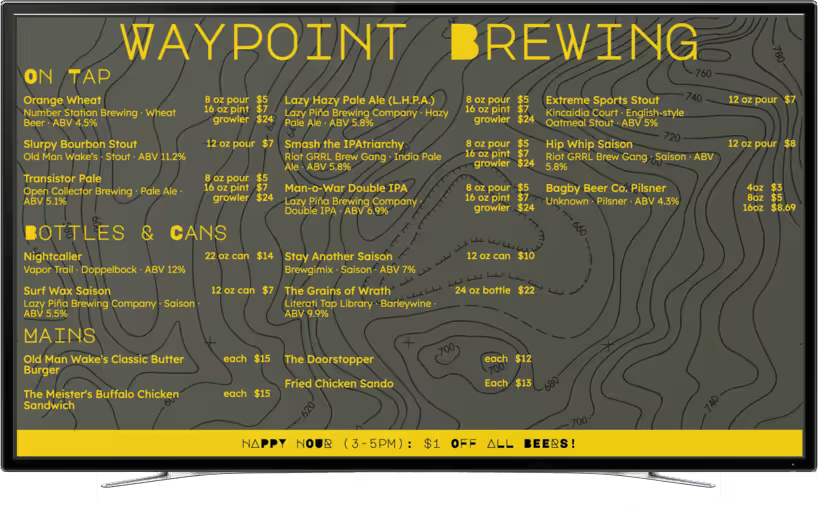
Easy digital menus with Square and Taplist.io
When you activate the Square integration in your Taplist.io account, we'll automatically and continuously sync your Square for Restaurants menus and products with your Taplist.io account to instantly show them on your TV, web, and print menus.
Here's what you can expect:
- Instant sync from your Square for Restaurants menus. Full support for Square for Restaurants. Edit a menu in Square and the change flows straight to your Taplist.io screens.
- Full support for inventory. Square inventory counts and “sold out” statuses are automatically translated into the equivalent Taplist.io concepts. When you 86 a product on your POS, it's instantly hidden on your Taplist.io menus.
- Fast, instant setup. No data entry and no IT project. Just click through to authorize Taplist.io with your Square account, and we'll take care of the rest.
- Full support for multiple TVs. Show everything on a single TV, or install and link multiple TVs throughout your location.
- Built for beer, food, and more. Make your menus stand out with the details your customers care about — ABV, IBU, style, and tasting notes. Choose from our library of built-in HD backgrounds, fonts, illustrations, and more. No designer required.
- Printed menu designer. Easily create and customize printed menus that are driven by your Square catalog. No need to type anything twice.
How to get started with Taplist.io's Square integration
Taking advantage of this integration is really simple. Here's how:
- Get an account. You'll need a Taplist.io account on our Pro plan. We are famous for our friendly support, no-contract pricing, and great service. Get started now.
- Authorize Square in the dashboard. Visit the POS Sync Integration Page, tap Start POS Sync, and click through to connect your Square account. That's it — we'll take care of the rest.
For additional steps and help, see the Square and Taplist.io Integration Guide in our Help Center.
Get your Square menu on an instantly-updating TV screen
Unlock a free 14-day trial including all Pro Plan features!
Backed by our money-back guarantee.
FAQ
In some cases we charge an additional monthly fee for additional activated TVs. See our transparent pricing page for detail.
Amazing menus await
Activate your free trial and start building your menu now.
Backed by our money-back guarantee.
Understand why leading bars and breweries generate more sales and cut costs by using Taplist.io to manage their menus.